
下載
在這個頁面你可以下載到最新版本的門羅幣軟體,包括硬體錢包、輕錢包與行動錢包。
GUI 錢包
GUI 錢包提供了不錯的使用者界面,以符合大多數使用者的需求,最適合想要快速收發 XMR 的入門使用者。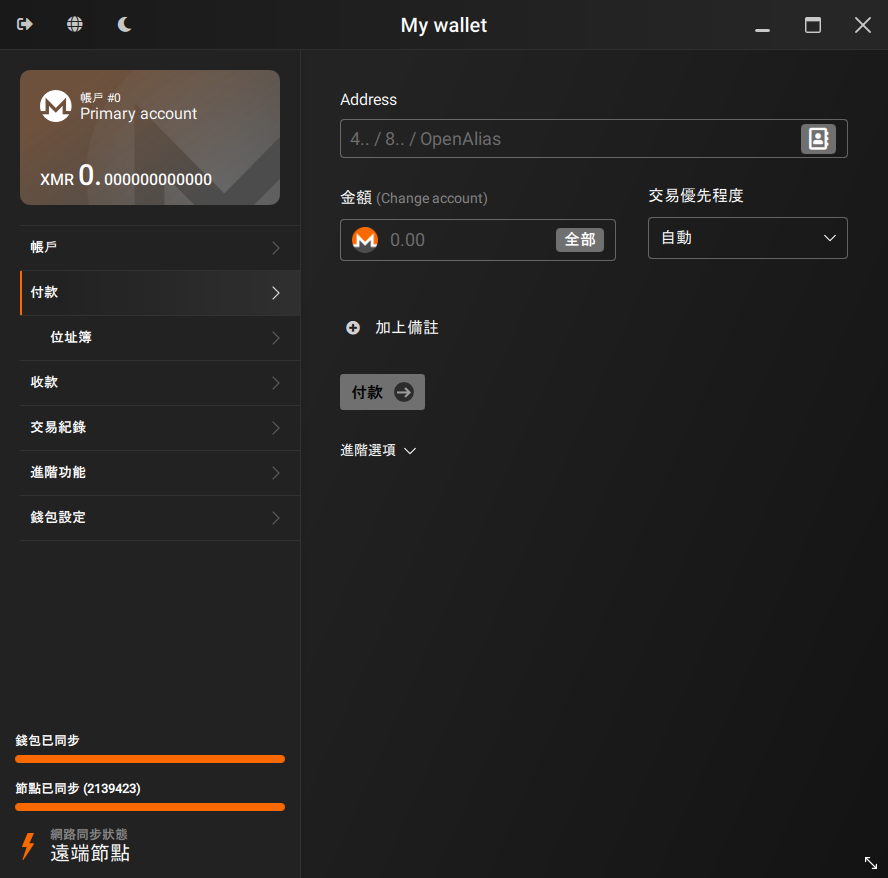
- 簡易模式. 設計給入門的使用者,只想要用最快最簡單的方式使用門羅幣。建立錢包,自動連接至@遠端節點,發送/接收 XMR,搞定!
- 進階模式. 提供完整的進階功能,適合給希望完全掌控錢包與節點的進階門羅幣使用者
- 收銀台模式. 輕鬆地接受你的客戶付款
- 與硬體錢包相容 如 Trezor 與 Ledger
- APP 內匯率轉換. 不再需要上網去換算你的 XMR 餘額
- 區塊鏈修剪. 硬碟空間不足嗎?使用 pruning 後就可以只需要下載 1/3 的區塊鏈
- 支援30+ 種語言
下載
目前版本: 0.18.5.2 - Fluorine Fermi (release notes)
There are also packages available for multiple Linux distributions. See the list on GitHub.
Antivirus
Be aware that some antiviruses and firewalls may flag the Monero executables and archives as malware. More info in the FAQ.
驗證
You are strongly advised to verify the hashes of the archive you downloaded. This will confirm that the files you downloaded perfectly match the files uploaded by the Monero development workgroup. Please don't underestimate this step, a corrupted archive could result in lost funds. Always verify your downloads! 務必驗證你的下載檔案!
顯示下載檔案的雜湊碼
These SHA256 hashes are listed for convenience, but a GPG-signed list of the hashes is at getmonero.org/downloads/hashes.txt and should be treated as canonical, with the signature checked against the appropriate GPG key getmonero.org/downloads/hashes.txt in the source code Two guides are available to guide you through the verification process:.
有兩個教學可以引導你進行驗證的步驟: 在 windows 系統上驗證執行檔 (入門) - 在 Linux, Mac, 或 Windows 系統上驗證執行檔 (進階).
- Windows 64-bit (Installer)
- e3c5f1f2661b624d1fd3d264c01c23cf2c1f774cbd6555251abe37dd23868573
- Windows 64-bit (Zip)
- e7a11d2faa6c4f223984b4064965fd1f37aea6b3c1d1658ce7150fe84680713f
- macOS Intel
- b57cef077a3d5db26a3b3ed0831f879d6c8cbd67e7cffd8091865b90e86b1335
- macOS ARM
- 26efb1be1a409b4dd9090b1c0ca2ee95ef4a3d0a42fdfb83cddbba6c048e1cc0
- Linux 64-bit
- 294017a5aa1ee86420b0c62fe4046000f42438375a8559d9ff55e41e5c6cbbcd
- Source Code (archive)
- c4fcdb606ae79f6f9f9f718f15ccc5cc411c8be5759a5172dc2736e1bfc3b8f8
幫助與支援
A guide with an explanation of every section of the wallet is available: 查看最新的釋出.
If you are experiencing issues or you need more info, feel free to reach out to the community. You can join to #monero-support or check out the Hangouts page for a more complete and detailed list of contacts and chatrooms.
CLI 錢包
An open-source command line interface (CLI) wallet developed by the Monero community, completely free to use, best suited for developers, intermediate, and advanced users. CLI 錢包提供你完整的節點與資金控制,高度可客製化且附帶許多分析工具,包括 HTTP RPC 與 0MQ 界面。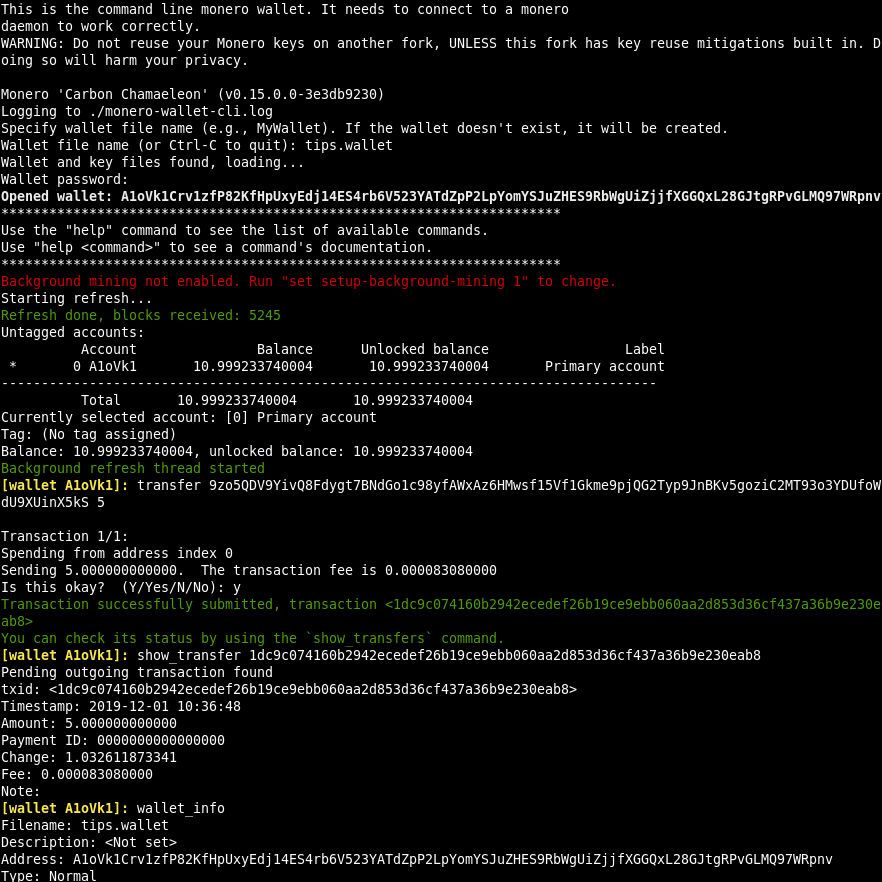
- 本地或遠端節點. 使用本地或遠端伺服器的區塊鏈數據
- 以 Tor 或 I2P 廣播交易資料. 獲得額外的隱私保護
- 引導節點. 在本機同步區塊鏈時暫時使用@遠端節點,這樣可以讓你立即開始使用門羅幣,待同步完成後即會切換回你自己的節點
- 與硬體錢包相容 如 Trezor 與 Ledger
- RPC 錢包與節點 附帶在下載檔案中
- 區塊鏈修剪. 硬碟空間不足嗎?使用 pruning 後就可以只需要下載 1/3 的區塊鏈
下載
目前版本: 0.18.5.1 - Fluorine Fermi (release notes)
There are also packages available for multiple Linux distributions. See the list on GitHub.
Antivirus
Be aware that some antiviruses and firewalls may flag the Monero executables and archives as malware. More info in the FAQ.
驗證
You are strongly advised to verify the hashes of the archive you downloaded. This will confirm that the files you downloaded perfectly match the files uploaded by the Monero development workgroup. Please don't underestimate this step, a corrupted archive could result in lost funds. Always verify your downloads! 務必驗證你的下載檔案!
顯示下載檔案的雜湊碼
These SHA256 hashes are listed for convenience, but a GPG-signed list of the hashes is at getmonero.org/downloads/hashes.txt and should be treated as canonical, with the signature checked against the appropriate GPG key getmonero.org/downloads/hashes.txt in the source code Two guides are available to guide you through the verification process:.
有兩個教學可以引導你進行驗證的步驟: 在 windows 系統上驗證執行檔 (入門) - 在 Linux, Mac, 或 Windows 系統上驗證執行檔 (進階).
- Windows 64-bit
- cf2ae8273977697d9ef2031c7337b781e6e5936578f602444b2990a173a2437d
- Windows 32-bit
- f79746868794786ba4ca3c5a30191263ffb0b9a4ab1c0ffcbe30fd5d04986380
- macOS Intel
- 82e305bbf6128b386571bed173dae316f9dd06c4ee1217c5eda849444bec89a9
- macOS ARM
- dba08921841e675384ce019fd7c93b59fe7b1e6edaa0a3cf0e3253e263f61864
- Linux 64-bit
- 22a7dda7b0cb699fdd6b7674c3b4a4465b337cc98a54983523b759e1e7cc9958
- Linux 32-bit
- 68783d76d9eac543d593ca1bdfa9c7eb540ec6c646acc68421702465c1d86182
- Linux ARMv8
- c0caf042cb7c7b760f5ad6be188084b59352440b32990a78b8051497b9398dbc
- Linux ARMv7
- bd6693ac411919d474d98c9e7d7bae1f03e7ef7f1d779a15e2ba3a188c958d36
- Linux RISC-V 64-bit
- 28ead34fa4320ea6809f16c4b064d3b430e71caf3155d25677cc624388fc0ee5
- Android ARMv8
- a2c0fb240c5eaa947f5a2382ece4613c59b299645ad4d1480ef24e71b8aa8c8f
- Android ARMv7
- daa56844251a9e9f296caaaafcf72c60dade54ae93146085d627ffc883b0fec3
- FreeBSD 64-bit
- cc32bb64fb577254fe24441e2db0b722dfedff5c953427ffbf396dc16f0feb62
- Source Code (archive)
- 9ec6ed0fd37db9d81cf7738a5f0536cf9aec6ed8ef8fd48649a59a6aaf20de3d
幫助與支援
If you are experiencing issues or you need more info, feel free to reach out to the community. You can join to #monero-support or check out the Hangouts page for a more complete and detailed list of contacts and chatrooms.
行動 &輕錢包
以下是被社群視為安全的行動錢包或輕錢包,如果你喜歡的錢包沒有被列在這裡,你可以找社群來試看看。到我們的 聊天室 page to see where we are.
Local synchronization
These wallets connect to remote nodes and scan the blockchain on your device, without sharing any key with the nodes. They provide higher privacy, but require more time synchronizing, since missing blocks will be scanned only when the wallet is opened.
| Wallet | Mobile | Desktop | Source Code |
|---|---|---|---|
 ANONERO ANONERO |
X | ||
 Cake Wallet / Monero.com Cake Wallet / Monero.com |
|||
 Feather Feather |
X | ||
 Monerujo Monerujo |
X | ||
 Monfluo Monfluo |
X | ||
 Stack Wallet Stack Wallet |
|||
 Unstoppable Unstoppable |
X |
Remote synchronization (lightweight)
These wallets share your private view key with a remote server, which continuously scans the blockchain looking for your transactions. They are faster to use, but your privacy can be lessened if you don't control the remote server.
| Wallet | Mobile | Desktop | Source Code |
|---|---|---|---|
 Edge Edge |
X |
Local synchronization
These wallets connect to remote nodes and scan the blockchain on your device, without sharing any key with the nodes. They provide higher privacy, but require more time synchronizing, since missing blocks will be scanned only when the wallet is opened.
Remote synchronization (lightweight)
These wallets share your private view key with a remote server, which continuously scans the blockchain looking for your transactions. They are faster to use, but your privacy can be lessened if you don't control the remote server.
硬體錢包
Hardware wallets are cryptographically secure devices that help keep your coins safe. Monero is currently supported by Ledger Nano (S, S Plus, and X) and Trezor (Model T, Safe 3, Safe 5)
| Hardware Wallet | Model(s) | Wallets | Min. firmware version |
|---|---|---|---|
 |
|
|
|
 |
|
|
|
-
Models that support Monero:
- Nano S
- Nano S Plus
- Nano X Wallets:
- Monero GUI
- Monero CLI
- Cake Wallet / Monero.com
- Feather
- Monerujo Min. firmware version:
- Nano S: 2.1.0
- Nano S Plus: 1.0.3
- Nano X: 2.0.2
-
Models that support Monero:
- Model T
- Safe 3
- Safe 5 Wallets:
- Monero GUI
- Monero CLI
- Feather Min. firmware version:
- 2.5.2